GFA Studio for macOS
Apple Silicon + supported Intel MacsA signed and notarized installer with automatic connection to the official GFA extension.
macOS installer coming soon Google Automator
Turn images generated in Google Flow into narrated Shorts, Reels and long-form videos. Studio builds the scenes, captions, voice and motion while your media stays on your computer.
Public test: use the official GFA extension. No Studio login or active membership is required.
No Terminal, developer tools or manual extension setup. The public release will install everything Studio needs in one guided setup.
Official installers will be published only on this page.
A signed and notarized installer with automatic connection to the official GFA extension.
macOS installer coming soonA signed setup application with secure local credential storage and automatic extension connection.
Windows installer coming soonEvery release will show its version, file size and checksum. Do not download GFA Studio from third-party websites.
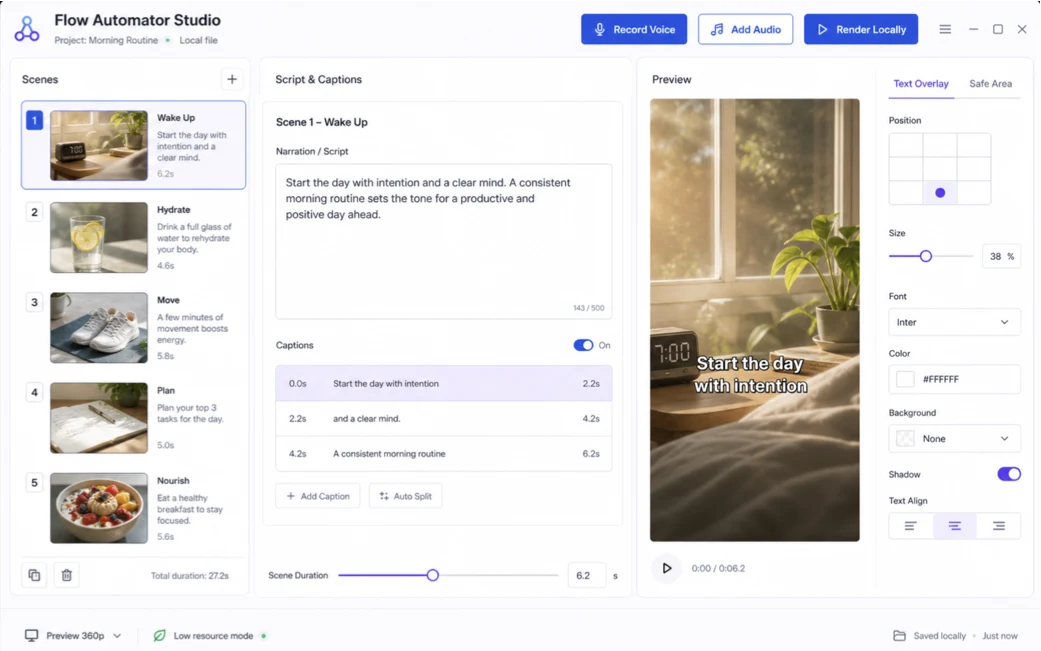
Studio stays out of the way until your images are ready, then automates the repetitive editing work while keeping every scene adjustable.
Select your generated images in the extension. Each image becomes a scene and keeps the prompt used to create it.
Delete mistakes, reorder scenes, then generate prompt-aware narration and captions or add your own recording.
Studio combines motion, transitions, captions and audio locally into a vertical, widescreen or square video.
Start with sensible defaults, then change only what matters.
Studio uses each saved Flow prompt to create a coherent script and matching captions across all scenes.
Natural zoom, pan, drift, push, cover and reveal presets give still images presentation-style movement.
Change text, font, color, size and position directly on the preview.
Use OpenAI or ElevenLabs, record directly, or upload narration.
Trim the ends and remove unwanted middle sections without changing the original.
Images, recordings, project files and rendered videos stay in the local folder you choose. Your API keys are stored by your operating system—not in the extension or a GFA database.
GFA never receives your media or AI keys. Studio login and membership verification are disabled during the public test. Network access is used only when you explicitly choose an AI provider feature.
Video rendering and audio work are too heavy for a browser extension. A separate companion keeps the extension lightweight and lets your computer handle media and credentials safely.
No. The public GFA Studio installer is designed to include the required local components. Customers will not need Node.js, developer tools or manual extension configuration.
No GFA media server is required. Selected Flow images are copied into your local project folder and rendering happens on your computer.
No. Studio login and membership checks are temporarily disabled for testing. You still need the official GFA extension to connect Flow images to Studio.
Yes. Every imported image becomes an individual scene and can be deleted before narration or rendering.
Not in the first public version. The initial release focuses on turning images already created in Google Flow into finished videos.
Install once, send your images from the official extension, and turn them into a polished video without uploading your project to a GFA media server.